Watch Me / Try Me: Simulation in Claude
The tool that started it all. Tim Slade's Claude demo is what sent me down this rabbit hole — so for the third build I ran the identical task in Claude. It produced the most polished result by default, gave me a way to design in real time… and then taught me a lesson about credits.
What Claude produced
Like the others, Claude produced a testable HTML file and a properly wrapped SCORM package. Here's a walkthrough of the result it built.
The same 6-step task: changing the language of a course in Lenovo 360 Learning Center.
Text description of this video
A walkthrough of the simulation Claude produced for the same six-step task — changing the language of a course in the Lenovo 360 Learning Center.
- The simulation opens on a landing page Claude generated automatically.
- Watch Me mode demonstrates each of the six steps in sequence.
- Try Me mode has the learner click through the same hotspots themselves, with feedback on each attempt.
- A player layer wraps the experience with controls such as pause and restart.
- The finished course is exported as a SCORM package.
Back to where it started
Claude was the whole reason for this experiment — Tim Slade's video showed Claude building exactly this kind of show-me / try-me simulation. I ran it on my personal account so I could get a fair, like-for-like comparison against the two tools I use at work.
Same inputs as before: the seven screenshots, the audio files, and a prompt. Like Copilot, Claude paused to ask me questions before it built anything.
It included things I didn't even ask for
This was the difference Tim Slade talked about. Where Copilot gave me a bit of a landing screen, Claude built out a full landing page — and it automatically added a player layer with controls to drive the experience. Things the other two either skipped or did less well, Claude included by default.
On the technical scorecard it landed squarely in the middle: faster than Copilot to first output, slower than ChatGPT, and it wrestled with hotspot alignment just as much as the others did.
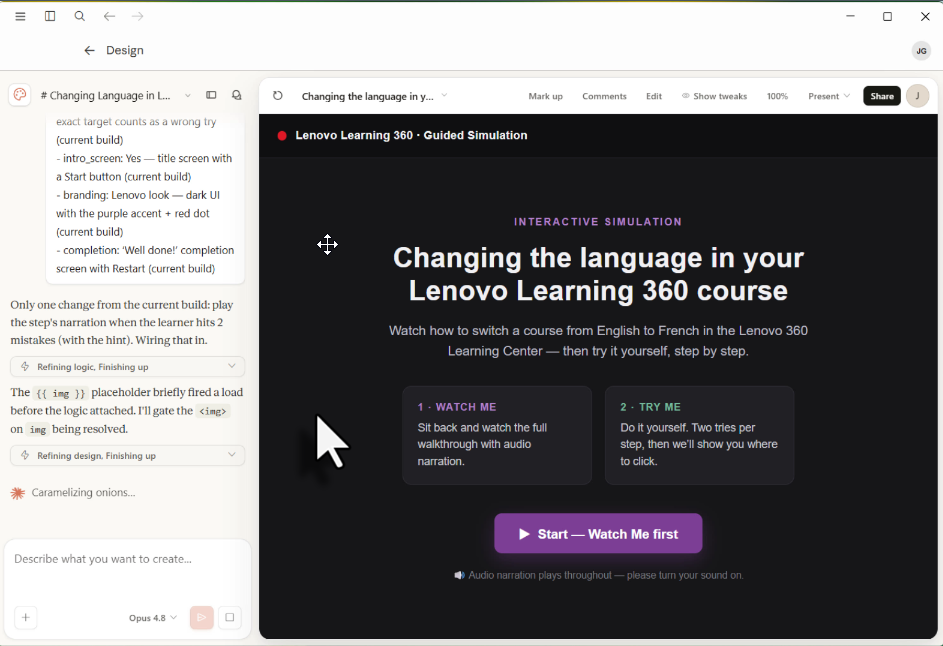
Watching it come to life on screen
Claude has a design mode where you prompt on the left and everything renders on the right, in real time. ChatGPT and Copilot package first, then you test. Being able to see and adjust directly in Claude Design is so refreshing — I could play with it, prompt again, fix something, and keep working before ever packaging anything up.
In that live view I added small things that make a real difference to learners — video pause, retry buttons, spacing out buttons so they're easier to hit, and a dozen other tiny refinements. Watching it unfold in real time genuinely made me happy.
Live preview while you prompt
Prompt, render, adjust, repeat — no package-then-test loop.
Learner-experience tweaks in seconds
Video pause, retry buttons, button spacing — small fixes that add up.
Polished defaults
A real landing page and a player control layer, with no prompting required.
Until I wasn't having fun
Then reality hit. My personal Claude subscription only takes me so far, and I ran out of credits fast — unlike Tim Slade, I couldn't even finish a single simulation before hitting the wall. On top of that, I ran into a Claude outage, something I'd never experienced with ChatGPT or Copilot. When it came back, Claude happily ingested the same seven screenshots and audio files and output a beautiful simulation.
But the credits math was unavoidable: what took me a few hours in ChatGPT took two days in Claude, purely because I kept timing out.
Take what you love — and bring it home
I loved the Claude experiment, but it occurred to me that if I took the things I loved about Claude's output and fed them back into ChatGPT as explicit instructions, I'd get an output I loved and be able to keep going without running into a wall. The best tool isn't always one tool — it's knowing what great looks like, then asking for it wherever you're working.
"If I took what I loved about the Claude output and put it back into ChatGPT as explicit instructions, I'd keep going and still get an output that I loved."
Would this actually teach better?
For the learner, Claude's defaults map closest to good learning design — a real landing page, player controls, and pacing I could tune live (pause, retry, button spacing all improve the experience). It produces the best learner experience of the three out of the box. The catch is reliability: the credit ceiling makes it impractical to build a full course start to finish, so the better experience is hard to deliver at scale.
All three built — now the verdict
Three tools, one identical task, three working simulations. Next I'll pull it together in a side-by-side comparison guide — speed, output quality, accessibility, and how maintainable each result is for real training.
Part of how I explore AI for learning
I run small, hands-on experiments like this to find what's genuinely useful — then bring the wins back to my team.