Watch Me / Try Me: Building a Software Simulation with ChatGPT
Can a chatbot build a working, SCORM-ready software simulation from a handful of screenshots? I put ChatGPT to the test on a real CRM/LMS workflow — and you can try the result right here.
The live simulation
This is the actual prototype ChatGPT produced — embedded live. Hit View Me to watch the steps narrate themselves, then Try Me to click through it yourself. (Audio is on.)
A 6-step task: changing the language of a course in Lenovo 360 Learning Center.
Text description of this interactive demo
The embedded prototype teaches a six-step task — changing the language of a course in the Lenovo 360 Learning Center.
- Watch Me plays the six steps as a guided demonstration.
- Try Me asks you to perform the steps yourself, clicking the correct on-screen hotspot at each stage.
- Correct clicks advance to the next step; incorrect clicks prompt you to try again.
- The prototype is the actual SCORM-ready output ChatGPT generated, running here in the browser.
One video, one question
I saw a post by Tim Slade where he used Claude to create classic Storyline-style “show me / try me” simulations. Watching his video was genuinely exciting — and it made me wonder what those same simulations would look like if I built them in the AIs I actually have approved at work: ChatGPT and Copilot. I took it one step further and built the identical simulation in Claude on my personal account too, so I'd have a clean comparison across all three.
This is part one — my impressions of ChatGPT. A post on Copilot, a post on Claude, and a final side-by-side comparison will follow. I picked one simple, real task and ran it through each tool the same way.
A simple 6-step task, start to finish
I picked a small, real workflow to keep the test honest: changing the language of a course in our Lenovo 360 Learning Center — six steps, login to language-switched.
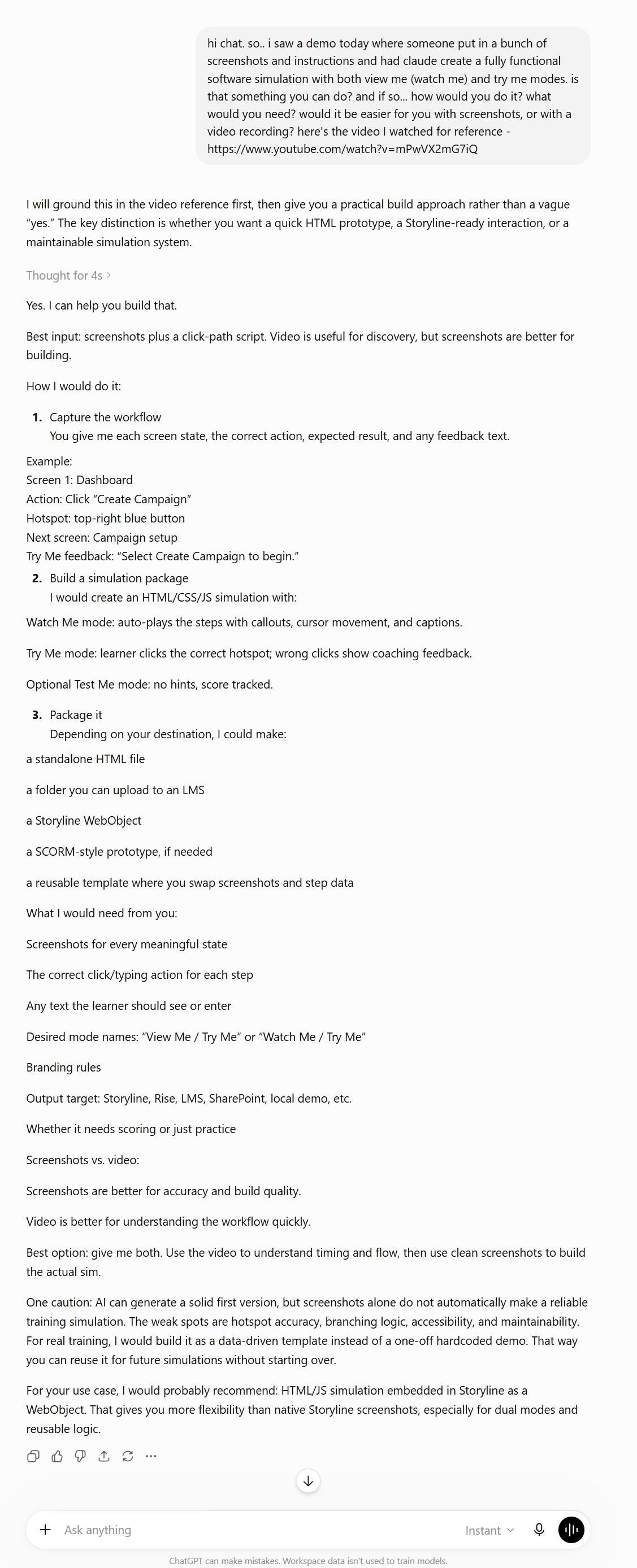
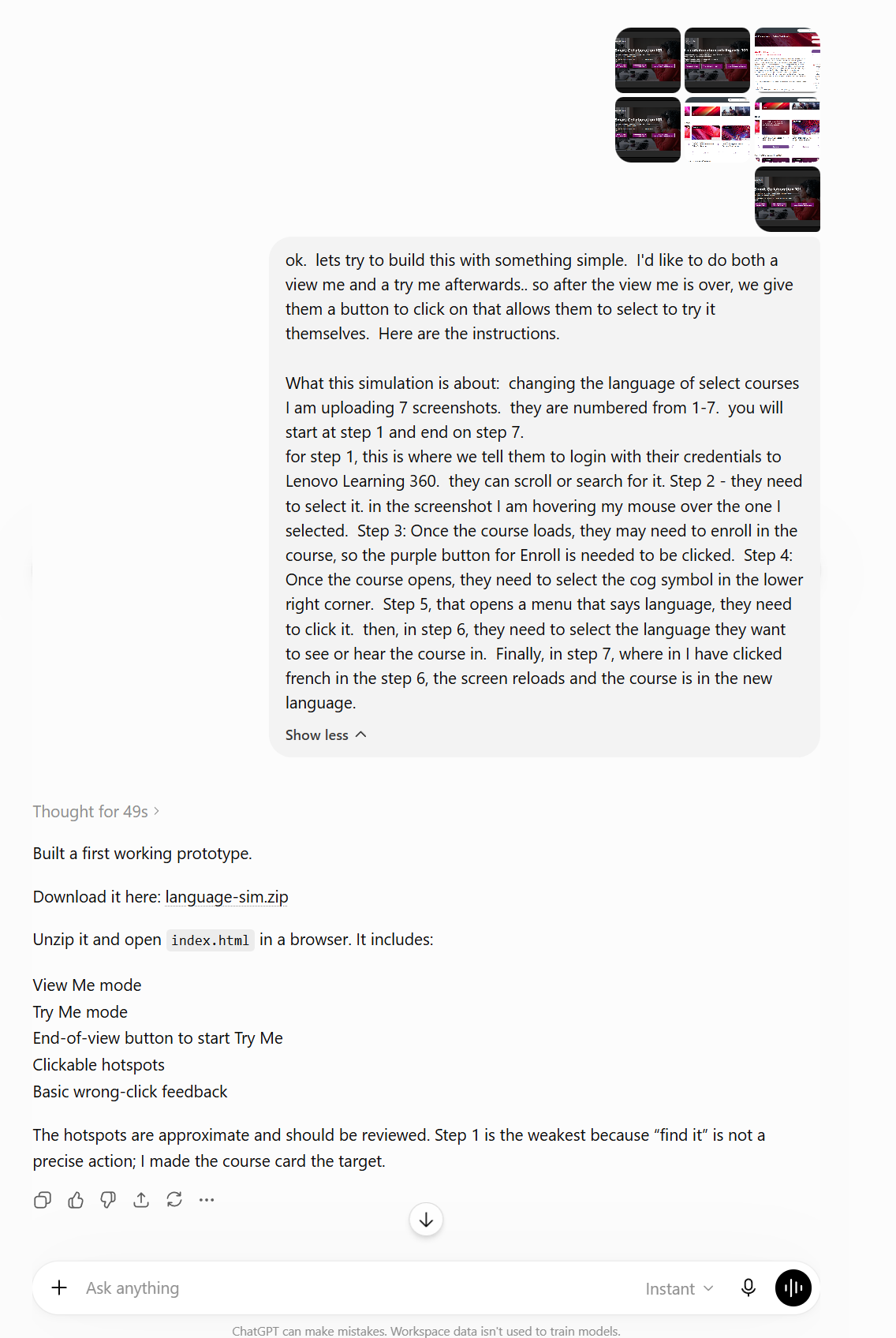
I gave ChatGPT a very simple prompt and seven screenshots. In literally one minute it handed me a downloadable HTML file to look at. One minute! It wasn't perfect — so over the next 40 minutes I iterated eight more times, added audio I generated in TechSmith Audiate, caught a mistake in how I'd submitted steps 1 and 2 that had confused it, and discovered that not only could it output a SCORM zip, but our LMS read it without issue.
Then I fell down the rabbit hole. As I write this I'm on iteration 23, about three hours in — not because it was failing, but because it was fun and kept getting better.
The actual ChatGPT conversation
No special setup — just a plain-language ask, the screenshots, and a step description. Here's how the exchange went.
Can ChatGPT do this? Yes — with caveats
ChatGPT absolutely can do this work. If this is the AI you have access to, give it a go — you can get a real, LMS-ready result. But a few things are worth knowing before you start:
You have to be explicit
It won't assume the scaffolding for you. Want an introduction/landing page? Say so. Want a player wrapper, or pause and restart functionality? Spell each one out. It builds exactly what you ask for — no more.
Hotspot placement took fighting
Several of my iterations were purely about getting hotspots in the right spot. It can do it — but expect to go back and forth on precise click-target placement.
Reproducibility is the real limitation
This was the biggest issue. I tried hard to write a custom GPT that would make the result reproducible — ran it about ten times — and couldn't get there. The output was always good, but there were always subtle differences. Guaranteeing a uniform, repeatable result simply wasn't possible for me.
Would this actually teach better?
It can — but only because I knew to demand the instructional scaffolding (a real landing page, hints, restart, feedback). Left to its defaults, ChatGPT produces competent clicking practice, not a designed learning experience. The instructional quality lives with the designer, not the tool — which is exactly why knowing what good learning looks like still matters more than the AI.
Same task, three tools
This is part one. Next I'll run the identical build in Claude and Copilot, then publish a side-by-side comparison guide — speed, output quality, accessibility, and how maintainable each result is for real training.
Part of how I explore AI for learning
I run small, hands-on experiments like this to find what's genuinely useful — then bring the wins back to my team.